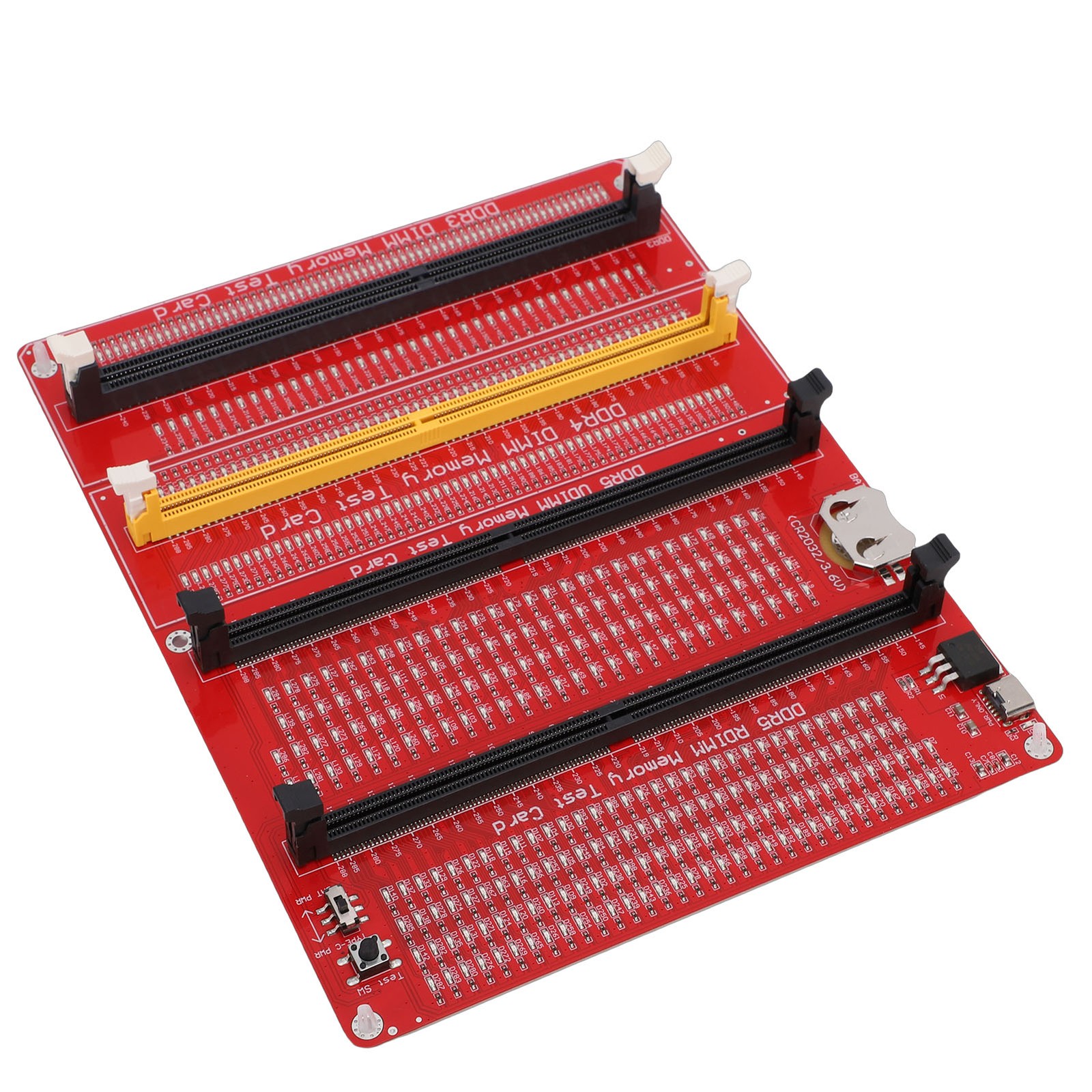
4 In 1 RAM Memory Tester Card Compact And Efficient For Desktop DDR3 DDR4 DDR5 For Sale
When you click on links to various merchants on this site and make a purchase, this can result in this site earning a commission. Affiliate programs and affiliations include, but are not limited to, the eBay Partner Network.

4 In 1 RAM Memory Tester Card Compact And Efficient For Desktop DDR3 DDR4 DDR5:
$36.38
1. POWER SUPPLY AND CHARGING: The RAM memory tester card offers dual power supply modes, can be powered by the battery or by inserting a standard TYPE C cable into the charging head or power bank. The second is that can be powered by batteries, can be charged and discharged simultaneously. When charging, the indicator light shows red. Once fully charged, the indicator light turns green
2. FUNCTIONS AND EFFECTS: The 4 in 1 memory tester is used to test various faults caused by hardware open circuits and short circuits in memory, and to solve problems such as poor performance of graphics memory
3. LED INDICATOR LIGHT: Use LED lights to test all data cables in the memory. When hardware faults occur in these data cable circuits, the brightness of the LED indicator lights will change, regardless of whether they are particularly bright or not. Install the battery into the battery holder or use a TYPE C cable to support fast charging. Insert the memory stick to be tested into the slot of the memory tester. If all the indicator lights are on and have the same brightness, it indicates that there is no open circuit or short circuit fault in the data line circuit of the memory module
4. USING TIPS: If the indicator light flashes during the test, it indicates poor touch with the gold finger. If the indicator light does not light up, it indicates that there is an open circuit fault in the hardware. Check the wear of the gold fingers, whether the resistor is damaged, and whether the PCB circuit is open. Identify the faulty pin according to the digital indication of the indicator light, and then use a multimeter to determine the specific cause of the fault. After passing the hardware test of the memory module, the issue of poor performance of the graphics memory should be considered, and alternative methods or corresponding test software should be used to locate the faulty graphics memory
5. APPLICABLE SCENARIO: Desktop computer RAM memory tester card is applicable to four types of RAM: desktop DDR3 and DDR4, DDR5 and server DDR5
Specification:
Item Type: 4 in 1 RAM Memory Tester Card
Material: PCB
Battery: 1 x button cell(not included)
Features:
1. Suitable for desktop DDR3, DDR4, DDR5 and server DDR5 RAM 4 types.
2. Uses appearance mount components, safe to use.
3. A good choice for repairing desktop and server computers.
Two Power Input Modes:
1. Type C slot power input
2. Button cell(not included)
Package List:
1 x Memory Card Tester
1 x USB Cable
4 x Accessories
1. Our listing price includes the value of goods,packaging cost,and exporttaxes,not including international duties.
2. duties,taxes,and charges are not included in the item price or shipping fee.
3.The duties are buyers' responsibility.Please check with your country'scustoms office determine what these additional costs will be prior to yourpurchase.
4. All disputes arising from the duties will be submitted to for solution.
1. Any questions,pls. contact us via message or email us.We will reply your message within 48 hours. If you do not receive our reply within 48 hours, pls. post a message again because sometimes our message system may block some emails.
2. If you are satisfied with our service, pls. kindly leave us a positive response and give us the Detailed Seller Rating with all "5" in very area3. Our aim is to provide Level Customer Service, your recognition will encourage us greatly and serve you better.We strive to keep all our customers satisfy.
We will do our up most to exceed your expectations in customer service, communication and dispatching of your orders.
On Jul 14, 2026 at 08:33:10 PDT, seller added the following information:
Related Items:
ADD2PSU 4 in 1 Power Supply Connector - Molex 4Pin/Sata/Atx 6Pin/4Pin Dual PSU
$18.99

HP 4NC55UT 30 Pins FHD 1920x1080 Replacement Screen LED LCD Display
$54.50
Corsair RM850e 850W ATX Modular Power Supply Unit Black CP-9020263
$65.00

Documentation
- AIX Local Security Checks
- Backdoors
- CentOS Local Security Checks
- CGI abuses
- CISCO
- Databases
- Debian Local Security Checks
- Default Unix Accounts
- Denial of Service
- Fedora Local Security Checks
- Finger abuses
- Firewalls
- FreeBSD Local Security Checks